
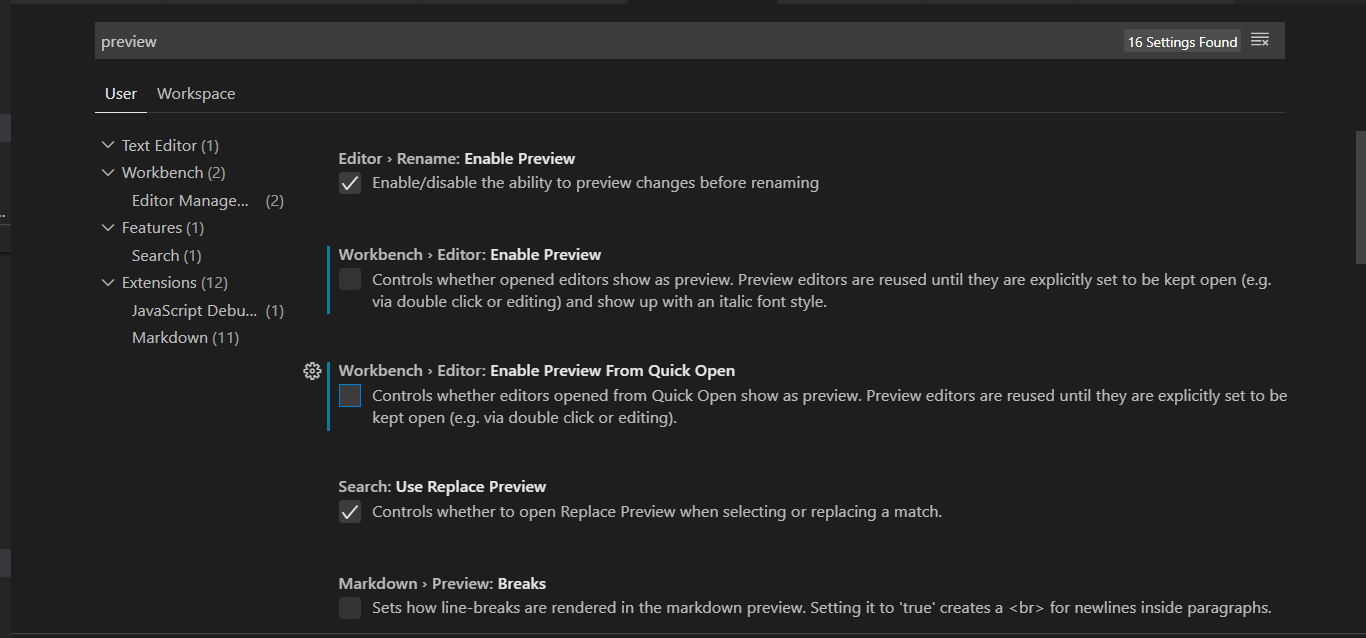
Uncheck the options Enable Preview and Enable Preview from Quick Open
Read-only archive. These discussions are from Tracston's earlier
technical forum and are kept online because the answers are still useful.
New replies are closed. Need help with something like this?
Talk to us.
Question
17 Oct 2020
When using Visual Studio Code 1.x with the newly introduced tabs.
When you click on files, the first file will open in a tab but If you do not make any changes to this file, the second clicked file will open in the same tab.
In order to open any file in new tab
go to File --> Preferences--> Settings
Attachment: nopreview.png
Need this fixed properly?
We do this for a living.
Kubernetes, DevOps and platform engineering, delivered in days — not another weekend lost to a stack trace.
Start a project →