One secured office server. Nothing leaves it.
Internal encrypted communication, a file station that scans every document coming and going, true AI redaction, a password vault and an office VPN — 28 modules on one backend, inside your own organization.
Not another SaaS subscription. Your own server.
One secured server — clustered and backed up — inside your own organization. Staff reach it over a built-in VPN and get internal encrypted mail, chat, calls and video meetings, document sharing that is scanned on every retrieval, a shared password vault and an authenticator. Nothing is routed through a public cloud and nothing leaves your network.
One backend. Every secure surface.
Five things that follow from keeping it in-house.
Most “secure” tools are someone else’s cloud with encryption bolted on. This one starts from the opposite premise.
One server, inside your organization
Mail, chat, documents, meetings, vault and MFA all run on a single server in your own rack or data centre — clustered and backed up, not sitting in someone else’s cloud.
Staff reach it over VPN, not the open internet
A WireGuard office VPN is built into the clients, on the same account, organization and RBAC as every other module — no second product and no second identity system.
Nothing leaks to the internet
No third-party SaaS in the path, no external subprocessor, and no data crossing a border you did not choose. AI runs over a sanctioned model path only, never a public service.
Documents are checked coming and going
Every file is scanned against antivirus, malware and DLP policy on upload and again on every retrieval — a file that was clean when stored cannot be handed back infected.
Audit-ready because the data never left
SOC 2, ISO 27001, GDPR, NIS2, HIPAA and PCI DSS get materially easier when there are no subprocessors to evidence. Append-only audit trail across every module.
The conversation never leaves the building.
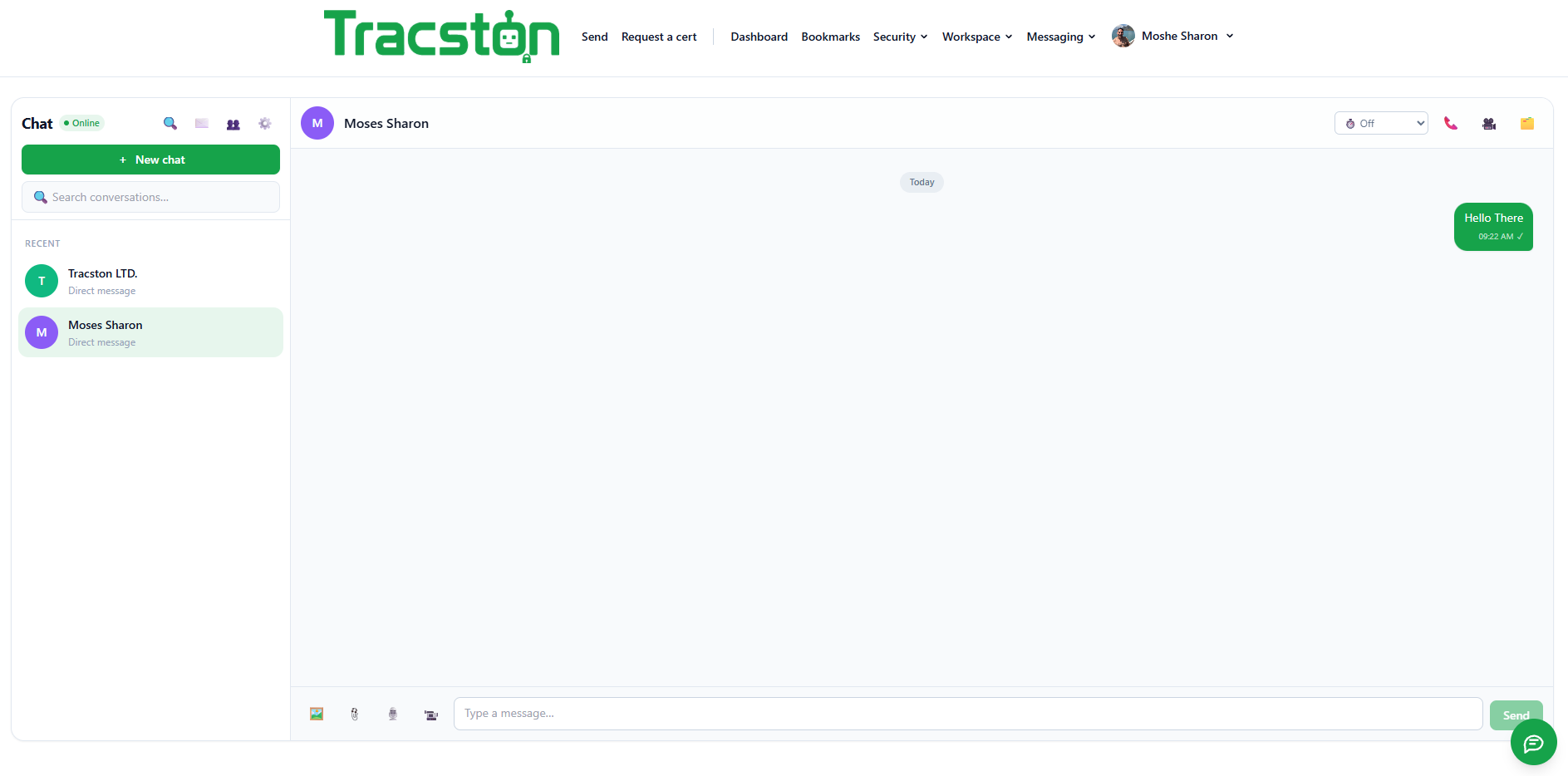
Chat, calls, video meetings and internal mail all terminate on your own server. There is no third-party messaging cloud in the path, so a conversation between two staff members is an internal conversation — technically, not just contractually.
WhatsApp-class chat, on your terms.
Personal and group chat, broadcast, channels, organizations, threads, mentions, voice notes, polls, scheduled messages, reactions, read receipts and presence — end-to-end encrypted with forward secrecy.
- Message expiration and remote wipe
- Screen watermarking, anti-copy / anti-download
- Screenshot detection where the platform supports it
- The server stores and relays ciphertext — it is a relay, not a reader

Everything around the conversation, too.
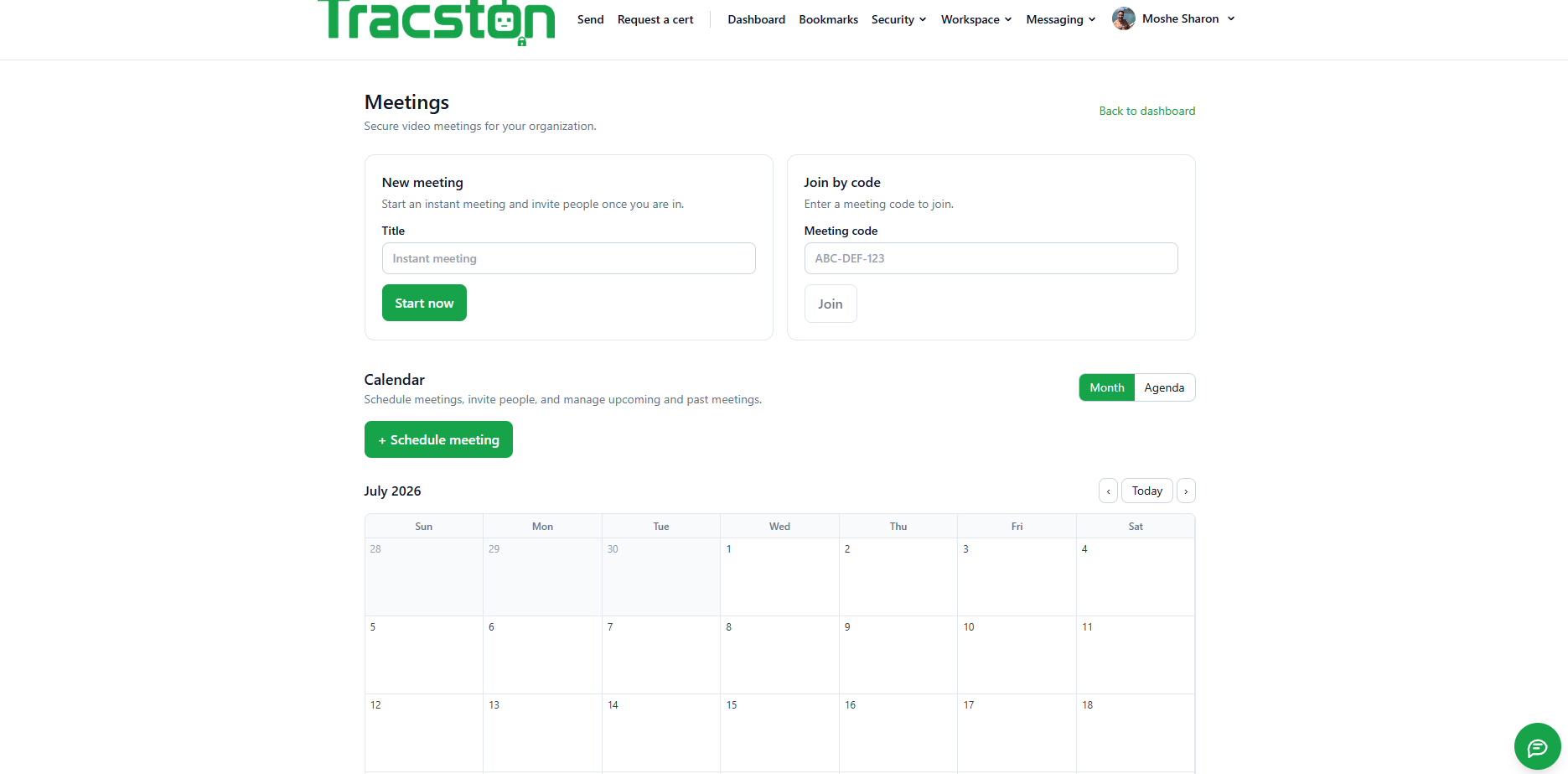
Start an instant meeting or schedule one from the built-in calendar, then get the whole surface around it — whiteboard, transcript, recordings and AI action items. Internal encrypted mail covers what does not belong in chat.
- Waiting room, passwords, breakout rooms, webinar mode, polls & Q&A
- Live captions and translation, background blur, screen share with annotation
- HD voice with noise suppression, push-to-talk, transcription and AI summaries
- Secure Email — internal encrypted mail + external gateway, PGP / S/MIME
- Incident rooms — one click links chat, meeting, whiteboard, files, timeline and a ticket

“Nothing leaves” is an architecture, not a promise
There is no third-party SaaS in the path, no external subprocessor to evidence, and no data crossing a border you did not choose. Even the AI runs over a sanctioned model path only — never a public service. That is what makes the audit conversation short.
A file station that checks documents both ways.
Most platforms scan a file once, on the way in. This one scans on upload and again on every retrieval — so a document that was clean when it was stored cannot be handed back infected or in breach of policy months later.
Scanned coming in. Scanned going out.
Every file passes antivirus, malware signatures and your organization’s own DLP policy in both directions. Signatures move; a file stored last quarter is re-checked against today’s definitions the moment someone asks for it.
- Antivirus + malware signature scanning on upload and retrieval
- Per-organization DLP policy, enforced server-side
- Clean-when-stored is not treated as clean-forever
- Blocked retrievals land in the append-only audit trail

Large files, versioned, watermarked, expiring.
End-to-end encrypted file sharing built for real documents, not 5 MB attachments — with the controls that decide who may take a copy out of the organization.
- Large files, versioning and version history
- Watermarking, expiration and download limits
- Password protection and external-sharing approval
- One-time, burn-after-read hand-off for a file or a text secret
- Digital signature — sign PDFs with an approval workflow and certificate validation

True redaction — the data is removed, not covered.
Upload a PDF, DOCX, PPTX, XLSX or image. AI plus OCR detects sensitive spans against your organization’s own rules, keywords and categories, and returns a sanitized copy. Optional human review, then hand-off straight to one-time sharing. Documents traverse only the sanctioned AI path.
The secure AI gateway
Staff already paste confidential material into public chatbots. A sanctioned gateway gives them approved models through a path you govern instead of a policy they ignore — and redaction actively reduces the sensitive data that can ever leave the organization in the first place.
What the crypto is, and what the server can read.
For the security engineers doing the evaluation.
Chat and calls
- Signal protocol — X3DH key agreement and the Double Ratchet, giving forward secrecy and post-compromise security
- Attachments encrypted with AES-256-GCM; the content key travels inside the end-to-end envelope, never beside it
- The server stores and relays ciphertext. It is a relay, not a reader
Media
- 1:1 calls — peer-to-peer, DTLS-SRTP
- Group meetings — a hardened SFU under DTLS-SRTP, branded Standard Secure: hop-by-hop encrypted, with the SFU forwarding streams
- E2EE meetings (optional) — SFrame-style encoded-media encryption with a per-meeting group key on an MLS track. The SFU forwards frames it cannot decrypt
- In-meeting chat reuses the Signal-based chat stack rather than a second protocol
Why the SFU is not a weakness
For group media, an SFU is required to fan out streams at usable bandwidth. Standard Secure encrypts every hop; when a meeting is marked E2EE, the media is encrypted at the encoder with a key the SFU never holds, so the server forwards frames it cannot read. We do not claim every meeting is end-to-end encrypted — the distinction is the point.
Every request verified — not trusted on a prior login.
| Control group | Mechanisms |
|---|---|
| Device | Device trust and posture, certificate pinning, tamper / jailbreak / root detection, hardware-backed keys, secure-enclave usage, encrypted local storage |
| Session | Session isolation, continuous authentication, session recording and replay, remote wipe |
| Risk | Risk scoring, behaviour analysis, geo-fencing, impossible-travel detection |
| Content | Screen watermark, clipboard protection, anti-copy / anti-download, DLP |
Administrators govern actions. They never read content.
Permissions and limits are enforced on the server, per user, role and organization — the client is never the enforcement point. Admins decide which modules are enabled, what may be shared externally, retention, legal hold and geo restrictions.
What they cannot do is read end-to-end encrypted content. Control and surveillance are deliberately separated — and every action lands in an append-only, filterable, exportable audit trail.

Already supports the frameworks enterprise buyers ask for.
Even at this stage the platform already includes support for a wide range of enterprise security and compliance frameworks. Keeping the data on your own server removes the subprocessor chain that normally makes these hard to evidence.
Built in three days. Still beta. Moving fast.
This system was built in just three days. It is still in beta — but most of the functionality is already working, and it is progressing very quickly. The framework support below is part of what already exists, not a roadmap.
We are telling you it is beta on purpose. Ask us what is finished, what is in flight and what the evidence pack looks like for the specific framework in your scope — you will get a straight answer.
| Attestations | SOC 1 Type II · SOC 2 Type II · SOC 3 |
|---|---|
| ISO/IEC | 27001 · 27017 · 27018 · 27701 · 42001 (AI management) · 9001 · 22301 |
| Cloud / baseline | CSA STAR Level 2 · Cyber Essentials Plus |
| Privacy | GDPR · UK GDPR · Swiss FADP · CCPA/CPRA · LGPD · PIPEDA · EU–US DPF |
| Healthcare & payments | HIPAA/HITECH (BAA) · PCI DSS Level 1 |
| Government | FedRAMP (Moderate & High) · StateRAMP · TX-RAMP · IRAP · BSI C5 · ENS High |
| EU / industry | NIS2 · DORA · TISAX |
| AI & frameworks | NIST AI RMF · NIST CSF 2.0 · CIS v8 |
These are the frameworks the platform supports and is mapped against — the control set it is built to satisfy. They are not claims of completed third-party audits or issued certificates; where you need attested evidence, we will tell you exactly where that framework stands today.
A corporate access VPN, not a consumer anonymity VPN.
The data plane is WireGuard, embedded in the clients. The control plane is ours: enrollment, key registration, config issuance, ACLs and revocation — on the same account, organization and RBAC as everything else.
- Enroll a device and get a ready-to-import configuration
- The server generates the key pair and shows the private key once — it is never stored
- Revoke a device to revoke its network access, from the same console
- No second product, no second identity system, no separate admin console

Services, APIs and how it deploys.
| Deployment | Managed cloud or fully self-hosted via Helm, with sizing profiles |
|---|---|
| Core services | Identity & Access, Presence, Chat, Voice/Video signaling, WebRTC SFU cluster, File, Vault & Secrets, Authenticator, AI, Search & Index, Notification, Audit & Compliance |
| Data tier | PostgreSQL, object storage, Redis, OpenSearch and a message bus |
| APIs | REST, GraphQL, WebSocket |
| SDKs | Python, Go, Java, .NET, Node.js, PowerShell |
| Identity | LDAP, Active Directory, Azure AD, Okta, Google Workspace, SAML, OIDC |
| Strong auth | Passkeys, FIDO2, smart cards, YubiKey, Face ID / Touch ID / Windows Hello, TOTP, hardware tokens |
| Ecosystem | Integrates with Tracston Resolve for operational workflows and incident response |
All 28 modules — plus the platform console.
Enumerated from the running system, grouped the way the product groups them. Five groups of product modules (28 in total), then the platform and administration surfaces (7 more). Everything on one backend, one account and one permissions model — nothing you have to integrate yourself, and org admins enable or restrict each module per user, role and organization.
Messaging
- Chat — WhatsApp-class end-to-end encrypted chat — personal and group, broadcast, channels, threads, mentions, voice notes, polls, scheduled messages, reactions, read receipts and presence, with message expiration, remote wipe, watermarking and anti-copy/anti-download.
- Calls — HD audio with noise suppression, push-to-talk, recording with approval, live transcription, AI summary and translation — with your full call history.
- Meetings — Waiting room, passwords, breakout rooms, webinar mode, polls and Q&A, background blur, live captions and translation, whiteboard, recording, AI notes and action items, screen share with remote control and annotation.
- Spaces — Shared team spaces that tie a group’s chat, pages, diagrams, files and tasks together in one place.
- Secure Mail — Outlook-grade secure webmail — bodies sealed at rest, access-controlled and audited — plus an external gateway with PGP / S/MIME.
- People — Your organization directory, with presence and one-click hand-off into chat, a call or a share.
Documents & files
- Files — Encrypted, one-time file sharing. Every upload is scanned for malware and sensitive content before it can be delivered — and again on retrieval.
- Documents — Organize, scan, version and securely share your documents, with watermarking, expiration, download limits and external-sharing approval.
- Document Redaction — Upload a document to black out sensitive information and manage your company’s keyword policy — true black-bar redaction, with the underlying data removed rather than covered and metadata stripped.
- Pages — Structured, encrypted long-form pages for the documentation that belongs next to the work.
- Diagrams — A canvas for flowcharts, architecture and mind maps, with AI diagram generation.
- Notes — Secure, encrypted notes — share with people and teams, link to a meeting, and keep bodies encrypted at rest.
Secrets & credentials
- Vault — Passwords, API keys, certificates, SSH keys, VPN profiles, JWT, OAuth secrets, AWS/Azure/GCP credentials, Kubernetes secrets and DB passwords — with folders, tags, favorites, reveal-on-demand, clipboard auto-clear and KeePass import.
- Send a secret — Paste a secret and get a one-time link. It is encrypted in the browser’s request and can be read only once — after it is viewed, or when it expires, it is destroyed.
- Request a secret — Ask someone for a credential and receive it over the same one-time channel. The sender never needs an account.
- Authenticator (MFA) — TOTP, HOTP, push MFA, hardware keys, recovery codes and device approval — on-device by default, with optional cross-device sync.
- Password generator — Create a strong, random password. Everything runs in your browser — nothing is sent to the server.
- Request a certificate — Download your organization’s root CA — the trust anchor for your own devices and services.
Work & coordination
- Tasks — Secure Kanban boards — organize work into columns and cards, assign teammates, set due dates and link tasks to notes, meetings and calendar events.
- Decisions — A shared decision log — capture the question, the options, and the choice with its rationale, so the reasoning survives the people.
- Approvals — Request and grant approvals — route a decision to the right people, track every response and see it on your timeline.
- Incidents — Track and coordinate incidents — severity, status, ownership and a running update log, with chat, meeting, files and timeline linked in.
- Calendar — Your meetings, holidays and events in one place, wired to tasks and notes.
- Groups — Create personal groups of people and reuse them as sharing targets.
Your workspace
- Dashboard — Everything addressed to you — secrets awaiting collection, approvals owed, today’s meetings and recent activity.
- Bookmarks — Your favorites across the workspace, collected in one place.
- Activity Timeline — Your work history, summarized — every send, open, approval and change in one auditable stream.
- Office VPN — Manage the devices you connect to the office network with WireGuard — enrollment, key registration, config issuance, ACLs and revocation on the same account and RBAC.
Platform & administration
- Organizations — Workspaces group your team, secrets, policies and billing — invite members, set security policy and share an audit trail.
- Enterprise SSO — SAML 2.0 and OIDC single sign-on with just-in-time provisioning, attribute mapping and a default role, alongside the data-protection controls.
- Integrations — Wire the platform into your terminal, CI, chat and secret managers — a
secretctlCLI, GitHub Actions and GitLab CI. Every recipe moves a one-time link, never the secret value. - API keys — Programmatic access over bearer tokens — shown once, scoped, expiring and limitable to specific source IPs.
- Downloads — The command-line tool and desktop app for every platform.
- Reports — Platform-wide usage, activity and security analytics across every organization.
- Admin console — Users, roles and permissions, devices, sessions, licenses, retention, legal hold, DLP, geo restrictions and the append-only audit trail.
Want this running inside your organization?
We scope the deployment in one meeting — sizing, identity integration, self-hosted or managed — and stand it up from there.
Start a project → See other work →