Excapia · MissionFlow & Journey Assurance

From workflows to MissionFlows.

Move beyond rigid workflows. Design, execute, test and continuously validate dynamic user journeys across web applications, enterprise systems and AI-driven environments.

Why MissionFlow

Traditional workflows assume fixed paths. Real users do not.

Real environments change. A test that passed yesterday breaks on a moved button, a renamed field or a slower dependency, and an AI-driven step may behave differently on every run.

  • Applications change
  • Interfaces change
  • Infrastructure changes
  • AI changes behavior dynamically

Excapia introduces MissionFlow: goal-driven execution that adapts to the environment while remaining governed, observable and testable.

Workflows follow steps.

The path is fixed in advance. When one step no longer fits, the run stops.

MissionFlows pursue outcomes.

The goal is fixed. The path is found, checked and adjusted on the way, within policy.

The difference

A list of steps, or a loop toward a goal.

Traditional workflow

  1. Step 1
  2. Step 2
  3. Step 3: the screen has changed
  4. Failure

MissionFlow

  1. 00Goal
  2. 01Observe the current state
  3. 02Choose the next action
  4. 03Execute
  5. 04Validate
  6. 05Adapt
  7. ✓Reach the outcome

↺ Observe → act → validate → adapt, until the outcome is reached

The product

A MissionFlow, as you build it.

The MissionFlow Designer in Excapia: the outcome comes first, then the paths that can reach it, the fallbacks when one fails, and the independent check that decides whether it really happened.
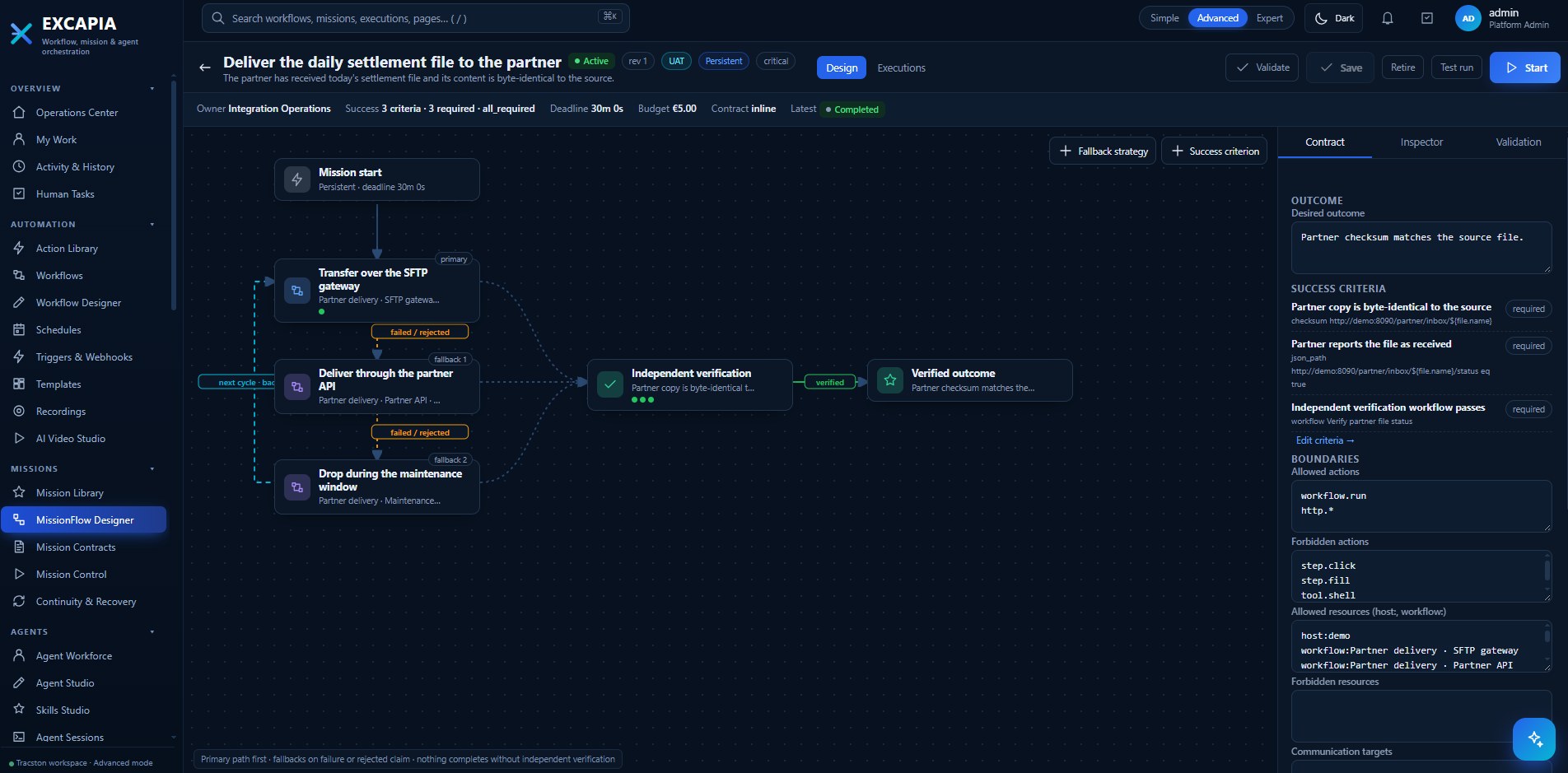
Excapia MissionFlow Designer showing the mission 'Deliver the daily settlement file to the partner': a primary path over the SFTP gateway, fallbacks through the partner API and a maintenance-window drop, an independent verification step and the verified outcome, with the mission contract panel listing the desired outcome, three required success criteria and the allowed and forbidden actions.

MissionFlow Designer. The primary path runs first, fallbacks take over on failure or a rejected claim, and nothing completes without independent verification against the contract's success criteria.

Key capabilities

Everything a journey needs, from the first click to the evidence.

Build and orchestrate

  • MissionFlow orchestration
  • Visual journey building
  • AI-generated journeys
  • Video-to-automation
  • Dynamic path execution
  • Adaptive decision engine
  • Agent-driven execution

Execute anything

  • Playwright browser automation
  • Python execution
  • HTTP / API actions
  • Mouse and keyboard automation
  • Screen recording
  • Random user profiles
  • Plugin system
  • Service packs

Test and assure

  • Pre-production QA
  • Production journey monitoring
  • Synthetic journeys
  • Real user path validation
  • QA mode
  • Production mode

Understand failures

  • Baseline comparison
  • Journey history
  • Failure analysis
  • Automatic remediation suggestions

Run isolated, in parallel

  • Sandbox execution
  • Docker / MicroVM / Pod
  • Parallel test environments
  • Local autonomous execution
  • Offline resilience

Deploy at scale

  • Collector architecture
  • Windows collectors
  • Linux collectors
  • macOS collectors
  • Multi-tenant operation

Video-to-MissionFlow

Show Excapia what to do.

Record a real user journey and upload the recording. Excapia turns what it sees into a candidate MissionFlow that a person reviews before it runs.

01 · Record

Capture the journey

A person performs the journey once, on screen, the way real users do.

02 · Analyze

Excapia reads the recording

  • Screens
  • Mouse movement
  • Clicks
  • Inputs
  • Navigation
  • Timing
  • Application state

03 · Review & run

A candidate MissionFlow

The user reviews it. Excapia then executes it and keeps it working as the application changes.

An AI-native execution agent

An agent that understands the goal, then does the work.

Excapia includes an execution agent that can write and run the automation a journey needs, see what is on screen, and keep going within the limits policy sets.

  • Understands goals
  • Writes automation
  • Generates Playwright
  • Uses Python
  • Calls APIs
  • Reads screenshots
  • Understands video
  • Uses audio where applicable
  • Interacts with browsers
  • Interacts with desktop applications
  • Operates mouse and keyboard
  • Creates sub-agents
  • Uses plugins and service packs
  • Maintains context
  • Resumable execution
  • Scheduled execution
  • Autonomous loops within policy

Model flexibility

Local, private or external models.

  • Local models
  • vLLM
  • Ollama
  • Private models
  • Claude
  • Codex
  • Gemini
  • External model APIs

Model choice depends on the deployment and is controlled by policy. External model use is optional.

Execution environment

Central control. Collectors near your applications. Isolated sandboxes.

Each collector runs several isolated journeys side by side in its own sandboxes. How many depends on the resources you give it.

Central Excapia, collectors and sandboxes Central Excapia assigns MissionFlows to collectors placed near the applications. Each collector runs journeys in parallel in isolated sandboxes: Docker, MicroVM, Pod or a native desktop. Central Excapiaplans · schedules · history Collector · Linux Collector · Windows Collector · macOS Docker MicroVM Pod Docker Desktop MicroVM Desktop Docker Pod Parallel isolated journeys per collector, sized to its resources

Resilience

Collectors keep working when the center is out of reach.

If central connectivity is temporarily unavailable, collectors continue executing their assigned MissionFlows, then catch up when it returns.

  1. Local schedule
  2. Local rules
  3. Cached execution plan
  4. Local watchdog
  5. Reconnect
  6. Results synchronization

Continuous QA

Test before production. Verify after production.

  1. Development
  2. QA
  3. Pre-production
  4. Production
  5. Continuous validation
QA automation

The same MissionFlow that tests a release before it ships becomes a regression suite that adapts when the interface moves.

Live operational assurance

After release, it keeps running against production as a synthetic journey, so a broken path is found before customers report it.

Journey observability

More than “did the test pass?”

  • Did the test pass?
  • Where did the journey slow down?
  • What changed?
  • Which screen failed?
  • Which dependency caused the failure?
  • Which AI action behaved differently?
  • What was the user impact?
  • What should be improved?

Testing AI-driven experiences

Testing AI agents takes more than pass or fail.

An AI assistant can answer, and still answer badly, slowly, expensively or outside policy. Excapia checks the things that matter for an AI-driven journey.

  • The AI agent responds correctly
  • Tool calls succeed
  • The expected policy is applied
  • Response quality meets the threshold
  • Latency is acceptable
  • Cost stays within budget
  • Human approval is triggered correctly
  • The fallback model operates
  • The MissionFlow reaches the required outcome

Screen recording

Every run leaves evidence.

Real screen recording on Windows, Linux and macOS: the screen, mouse movement and keyboard activity. Screenshots and recordings are attached to journey runs and failures, and can be replayed.

History of each MissionFlow run

  • Execution time
  • Steps taken
  • Dynamic decisions
  • Screenshots
  • Video
  • Logs
  • Errors
  • Agent reasoning summary, where permitted
  • Tool calls
  • Performance
  • Result
  • Baseline deviation

Structured history for QA sign-off and enterprise audit.

Where Excapia fits

Three core operating layers, plus a specialized execution platform.

Imperium, Otopia and Observatory are the core of the Tracston platform. Excapia sits next to them, closest to execution and validation.

Core Tracston operating layers

Plus
Excapia Executes and continuously validates real journeys. MissionFlow, journey execution and assurance.

Excapia executes.Observatory understands.

Excapia sends journey telemetry into Observatory, which correlates it with everything underneath, so a failed user journey can be traced to its technical root cause.

  • APM
  • AFPM
  • Infrastructure
  • Network
  • Applications
  • Databases
  • AI agents
  • Models
  • Business services
  • Incidents
Observatory →

Excapia acts.Imperium governs.

Where required, Excapia's actions can be governed through Imperium. This matters most when execution is autonomous.

  • Model access
  • Agent permissions
  • Tool access
  • Data classification
  • Production actions
  • External AI use
  • Budget rules
  • Approvals
  • Sensitive data boundaries
Imperium →

Excapia finds.Otopia coordinates.

  1. Excapia detects a broken customer journey.
  2. Otopia opens an investigation workspace.
  3. Agents collaborate; a remediation task is assigned.
  4. People review, and execution is approved.
  5. Excapia validates the repaired journey.
Otopia →

The complete Tracston story

From a broken journey to a verified fix.

  1. User journeyA real path through your services
  2. ExcapiaExecutes and validates the journey
  3. ObservatoryUnderstands the technical behavior
  4. ImperiumGoverns AI and action boundaries
  5. OtopiaHumans and agents investigate and coordinate
  6. ExcapiaRe-tests the journey
  7. VerifiedThe journey works again

Use cases

Wherever a journey has to keep working.

  • Customer portal testing
  • Banking journeys
  • Insurance workflows
  • E-commerce checkout
  • Government services
  • Internal enterprise applications
  • AI assistant testing
  • Agent testing
  • Authentication journeys
  • Multi-step forms
  • Legacy applications
  • Browser automation
  • Desktop application automation
  • Synthetic monitoring
  • Regression testing
  • Production validation

Deployment

Runs where your applications run.

  • On-premise
  • Private cloud
  • Cloud
  • Hybrid
  • Isolated environments
  • Enterprise VM deployment
  • Collectors near applications
  • Local AI where required

External model usage stays optional.